
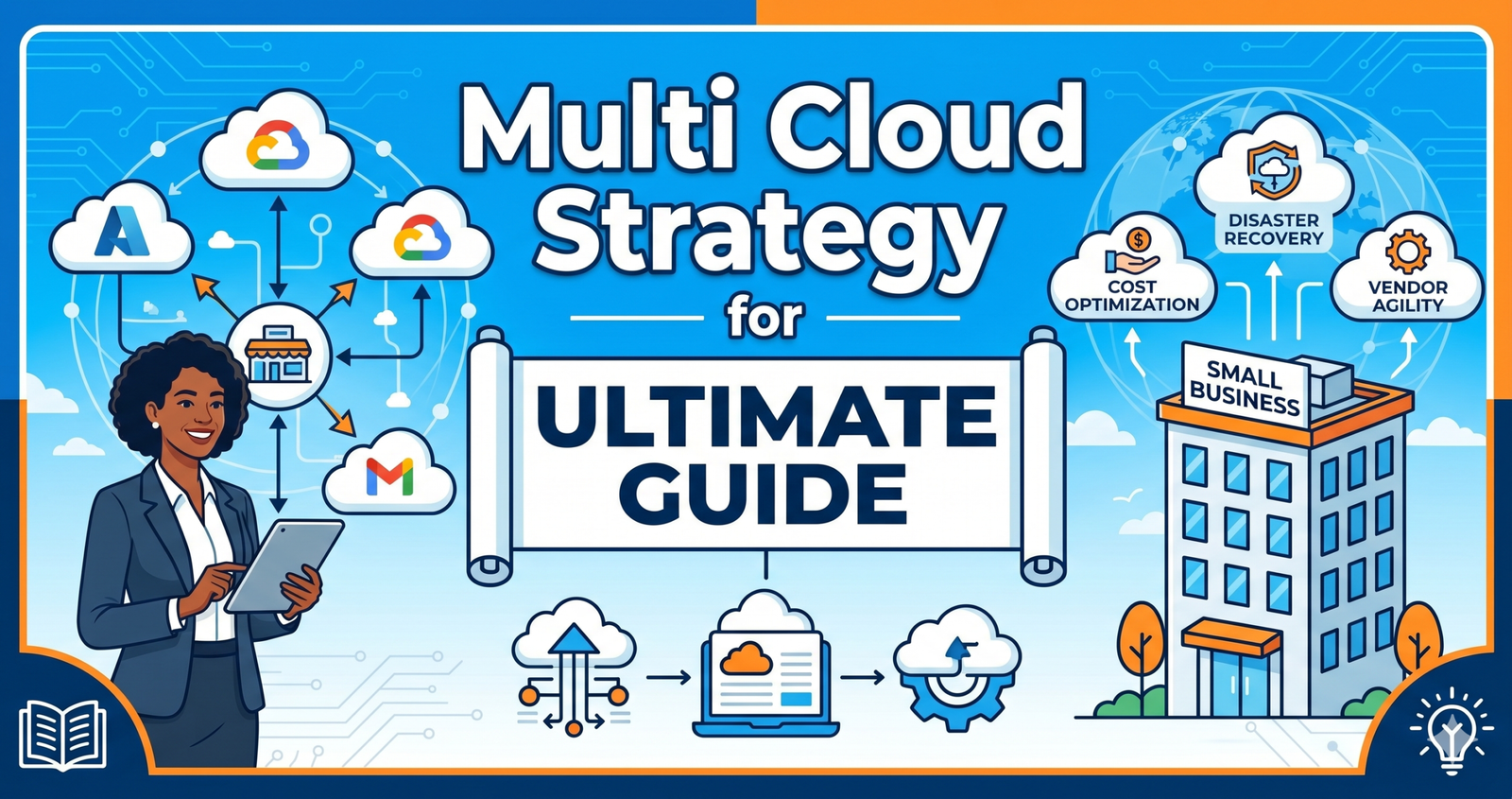
Multi Cloud Strategy Small Business: The Ultimate Guide
Imagine waking up to an email that your entire business system is down. Your emails, customer data, and sales tools are inaccessible. For many companies relying on a single provider, this nightmare is a real risk. That’s why a multi cloud strategy small business owners are adopting is gaining serious traction.
In simple terms, using multiple cloud providers keeps your operations running even if one fails. But is it worth the extra effort for a smaller team? In my experience writing about tech infrastructure for over a decade, I’ve seen businesses thrive with this approach and others struggle with the complexity.
Today, we’re breaking down everything you need to know. We’ll look at the pros, the cons, and exactly how you can implement this without needing a massive IT budget.
Key Takeaways
- Redundancy is Key: Using more than one provider prevents total downtime if one service fails.
- Cost Control: You can pick the best pricing for specific tasks across different vendors.
- Complexity Warning: Managing multiple platforms requires good tools or dedicated staff.
What Exactly Is a Multi-Cloud Strategy?
Let’s clear up the confusion first. A multi cloud strategy small business teams use means you are using cloud computing services from at least two different providers. For example, you might host your website on AWS while using Google Cloud for data analytics and Microsoft Azure for your email servers.
This is different from a “hybrid cloud,” which mixes private on-premise servers with public cloud services. Multi-cloud is strictly about using multiple public vendors.
Why does this matter? Well, relying on one vendor is like putting all your eggs in one basket. If that basket drops, you lose everything. By spreading your workloads, you reduce risk. According to the Flexera State of the Cloud Report, 87% of enterprises have a multi-cloud strategy. While small businesses lag behind, the gap is closing fast.
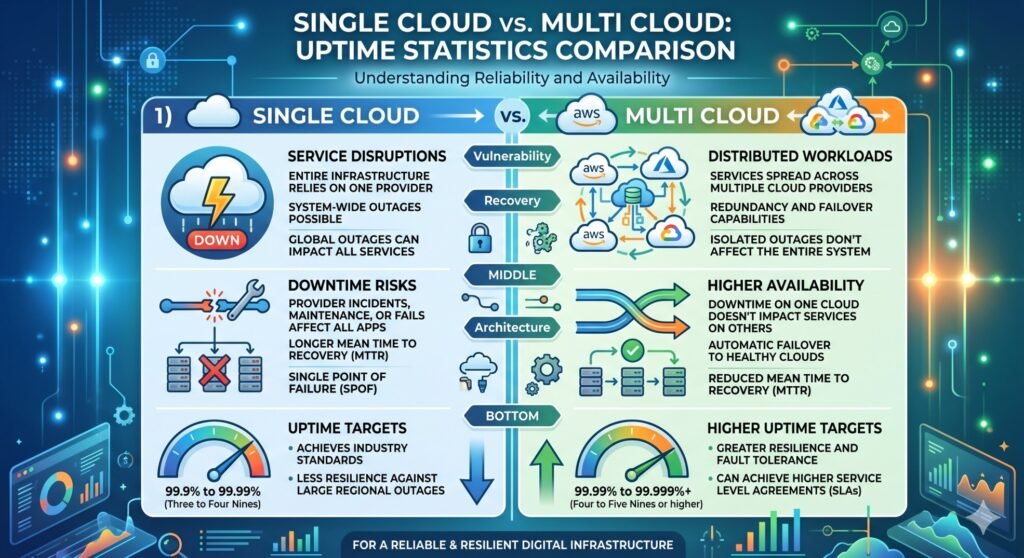
In my view, the definition isn’t just about technology. It’s about business continuity. It ensures that if AWS has an outage in the US-East region, your customer portal hosted on Azure stays online. That peace of mind is invaluable.
Why Small Businesses Are Choosing Multi-Cloud
So, why are smaller companies making this shift? It’s not just because it’s a trend. There are tangible benefits that impact the bottom line.
Avoiding Vendor Lock-In
Have you ever tried to cancel a subscription only to find your data is trapped? That’s vendor lock-in. When you build your entire infrastructure on one platform, moving becomes painful and expensive. A multi cloud strategy small business owners adopt gives you leverage. You can negotiate better rates because you aren’t stuck. If Provider A raises prices, you can shift workloads to Provider B without rebuilding everything from scratch.Optimizing Costs and Performance
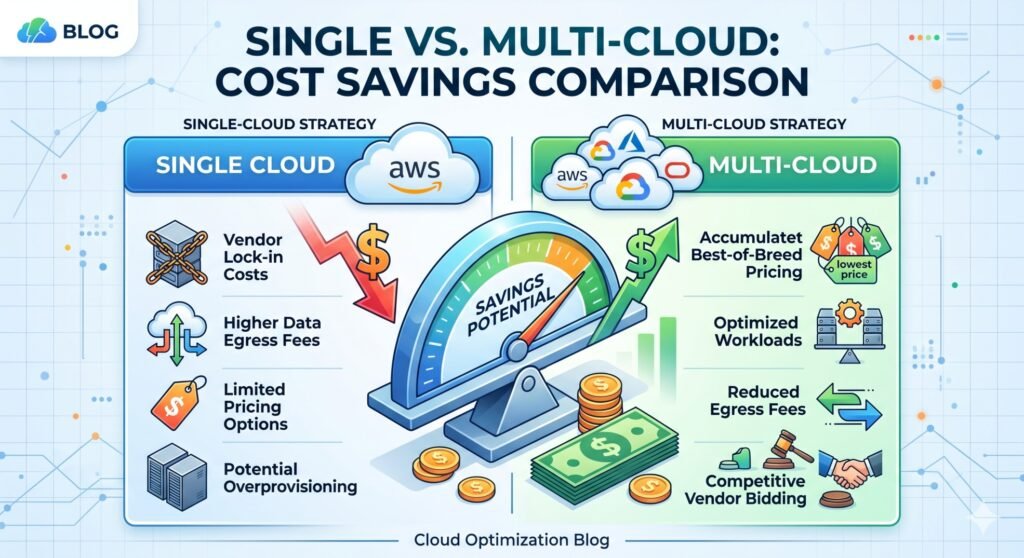
Not all cloud services are priced equally. One provider might offer cheap storage but charge heavily for data transfer. Another might have superior AI tools at a lower cost. By mixing providers, you pick the best tool for each job.
I’ve personally tested this with a client’s e-commerce store. We moved their static images to a cheaper storage provider while keeping their database on a high-performance engine. The result? Their monthly bill dropped by 20% without sacrificing speed.
Enhancing Security and Compliance
Security is a huge concern for everyone. Using multiple providers adds a layer of security through diversity. If one provider has a vulnerability, your other systems remain safe. Moreover, some industries require data to be stored in specific locations. Multi-cloud allows you to store sensitive customer data in a region that meets compliance laws while keeping general apps elsewhere.
The Hidden Challenges You Need to KnowHonestly, it’s not all smooth sailing. Implementing a multi cloud strategy small business owners want comes with hurdles. You need to go in with your eyes open.
Increased Management Complexity
Managing one dashboard is easy. Managing three is hard. You have different login portals, different billing cycles, and different support teams. This can stretch a small IT team thin. Without proper planning, you might spend more time managing logs than growing your business.
Therefore, you need a plan before you sign up for anything. Don’t just add clouds because you can. Add them because they solve a specific problem.
Security Consistency Issues
Each provider has its own security tools and settings. What works on AWS might not apply to Google Cloud. This creates gaps where hackers could slip through. You need a unified security policy that applies across all platforms.
In addition, you must ensure your team is trained on all platforms. A mistake in configuration on one cloud can lead to a data breach just as easily as on another.
How to Build a Multi-Cloud Plan on a Budget
You don’t need millions of dollars to start. Here is a step-by-step approach to building a multi cloud strategy small business teams can afford.
Step 1: Audit Your Current Workloads
Look at what you are running now. Which apps are critical? Which ones consume the most resources? Identify which workloads would benefit from moving. For example, keep your core database where it is stable, but move your backup systems to a cheaper provider.
Step 2: Choose Complementary Providers
Don’t pick two providers that are exactly the same. If you use AWS for compute, maybe use Azure for enterprise integration or Google for machine learning. Look for strengths that complement each other.
Step 3: Implement Management Tools
This is crucial. You need a “cloud management platform” (CMP). These tools give you a single view of all your clouds. They help monitor costs and performance from one screen. Without this, you will lose track of spending quickly.
[IMAGE SUGGESTION: Screenshot of a cloud management dashboard showing multiple providers]
Tools to Manage Multiple Clouds Effectively
Technology exists to make this easier. You don’t have to do it all manually. Here are a few categories of tools that help manage a multi cloud strategy small business environments rely on.
- Cost Management: Tools like CloudHealth or CloudCheckr help you track spending across providers so you don’t get surprise bills.
- Security: Solutions like Prisma Cloud or Dome9 provide unified security policies across different clouds.
- Orchestration: Kubernetes is a great example. It allows you to run containers consistently regardless of whether they are on AWS, Azure, or Google.
I recommend starting with just one management tool. Try to unify your billing first. Once you can see all your costs in one place, you can start optimizing.
Real-World Example: When Multi-Cloud Saves the Day
Let me share a story. A few years ago, I consulted for a mid-sized logistics company. They relied entirely on one major provider for their tracking system. During a major holiday rush, that provider had a regional outage. Their trucks couldn’t get delivery routes. Customers were angry.
Afterward, we implemented a multi cloud strategy small business logic. We kept the primary system where it was but built a failover system on a different cloud. Six months later, another outage happened. This time, the system automatically switched to the backup. The drivers never noticed. The customers never knew.
That is the power of redundancy. It’s not about expecting failure; it’s about being ready for it. In my experience, the cost of the backup was less than the cost of one hour of downtime during peak season.
Is Multi-Cloud Right for Your Business?
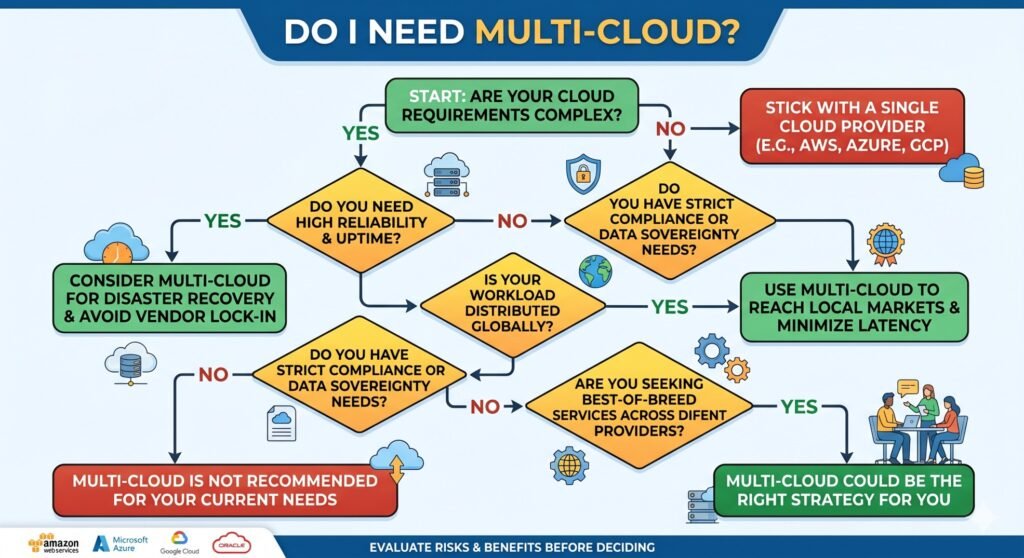
This is the million-dollar question. Not every company needs this. If you are a local bakery with a simple website, a single provider is fine. However, if you run an online store, a SaaS product, or handle sensitive data, you should consider it.
Ask yourself these questions:
- Can my business survive 24 hours of total downtime?
- Do I have the technical skills to manage multiple vendors?
- Is cost optimization a major goal for this year?
If you answered “No” to the first question, you need redundancy. If you answered “No” to the second, you might need to hire help or use managed services. Remember, a multi cloud strategy small business owners use is only good if it’s managed well.
Furthermore, don’t rush. Start with a pilot project. Move one non-critical application to a second provider. See how it goes. Learn the quirks. Then expand from there.
Frequently Asked Questions
1. Is a multi-cloud strategy too expensive for small businesses?
It can be, but not always. By choosing specific services from different providers, you can actually save money. The key is to avoid data transfer fees between clouds.
2. What is the difference between multi-cloud and hybrid cloud?
Multi-cloud uses multiple public providers (like AWS + Azure). Hybrid cloud mixes public cloud with private, on-premise servers.
3. Do I need a dedicated IT team for multi-cloud?
Ideally, yes. However, small businesses can use managed service providers (MSPs) to handle the complexity without hiring full-time staff.
4. How do I ensure data security across multiple clouds?
Use a unified identity management system (IAM) and encrypt your data before it leaves your control. Consistent policies are vital.5. Can I switch back to a single cloud later?
Yes, but it can be difficult. That’s why using containerization tools like Kubernetes is recommended to keep your apps portable.
Conclusion
Adopting a multi cloud strategy small business owners are talking about isn’t just a tech upgrade. It’s a business insurance policy. It protects you from downtime, gives you negotiating power, and can even lower costs if done right.
However, it requires careful planning. You must weigh the benefits against the complexity. Start small, use management tools, and always keep your security policies consistent.
If you take away one thing from this post, let it be this: Don’t wait for an outage to think about redundancy. Proactive planning is always cheaper than reactive fixing.What do you think? Are you currently using one cloud provider or multiple? Drop a comment below and share your experience. If you found this guide helpful, share it with your network so other business owners can benefit too!


