
Table of Contents
Stop AI Scams: Effective Ways to Protect Against Phishing
How to protect against AI-powered phishing attacksI remember back in the “good old days”—maybe just three or four years ago—when spotting a scam was easy. You’d get an email from a “Prince” with terrible grammar and blurry logos. You’d laugh, hit delete, and move on with your day.
Well, the game has changed. Today, hackers are using Generative AI like ChatGPT and deepfake voice technology to create scams that look and sound exactly like your boss, your bank, or even your mom. It’s a bit scary, right? In my experience writing about cybersecurity, I’ve seen how quickly these threats evolve. But here is the good news: you don’t need to be a tech genius to stay safe.
Quick Summary: Key Takeaways
- Trust, but verify: AI can mimic voices and writing styles perfectly; always use a second “out-of-band” method to confirm urgent requests.
- Look for “unnatural” speed: AI-powered phishing often involves immediate, high-pressure demands for money or data.
- Update your tech: Use AI-driven security tools to fight AI-driven threats.
What Exactly Are AI-Powered Phishing Attacks?
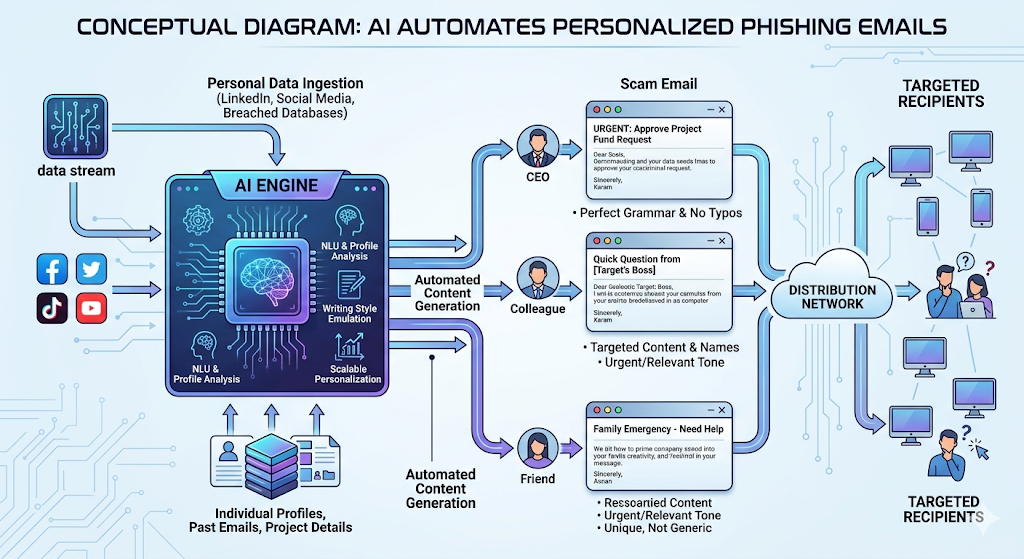
Phishing has always been about trickery. Traditionally, scammers sent thousands of generic emails hoping one person would click. Now, they use Artificial Intelligence to automate the “boring” parts and make the “scary” parts more convincing.
When we talk about how to protect against AI-powered phishing attacks, we’re dealing with three main upgrades to the old-school scam:
- Perfect Grammar: AI removes the spelling mistakes that used to tip us off.
- Personalization: AI can scrape your LinkedIn or Facebook to write an email that mentions your specific projects or hobbies.
- Scale: A hacker can now send 10,000 unique emails in the time it used to take to write one.
Why Your Gut Feeling Isn’t Enough Anymore
Honestly, I think we’ve become a bit overconfident. We think, “I’d never fall for that.” But imagine getting a voice note from your daughter saying she lost her phone and needs $200 for a taxi. The voice sounds 100% like her. That’s a “vishing” (voice phishing) attack powered by AI.
According to a recent report by SlashNext, there has been a 1,265% increase in malicious phishing emails since the launch of ChatGPT. This isn’t just a small trend; it’s a digital explosion. Moreover, because these tools can translate any language fluently, a scammer in another country can now sound like a native English speaker from your hometown.Moreover, because these tools can translate any language fluently, a scammer in another country can now sound like a native English speaker from your hometown. To understand the gravity of this shift, you can check out the latest CISA Phishing Guidance, which outlines how these tactics are evolving.
5 Practical Steps to Protect Against AI-Powered Phishing Attacks
You don’t have to live in fear. You just need a new “defense playbook.” Here is how you can harden your digital life against these smart bots.
1. Establish a “Safe Word” with Family
This might sound like something out of a spy movie, but it’s incredibly effective. Since AI can clone voices with just a 30-second clip from social media, talk to your family. Pick a random word—like “Pineapple” or “Blueberry”—that you only use in emergencies. If you get a suspicious call or text, ask for the word. If they don’t know it, it’s a bot.
2. Slow Down on “Urgency”
AI phishing thrives on panic. Whether it’s an email saying your “Netflix account is suspended” or a “Tax Office” warning, the goal is to make you click before you think. Stop. Take a breath. If a request seems urgent, it’s almost certainly a scam.
3. Use Multi-Factor Authentication (MFA)
I can’t stress this enough. If a scammer uses AI to steal your password, MFA is your last line of defense. Even if they have your login, they can’t get into your account without that second code on your phone.
4. Verify via a Different Channel
If your “boss” emails you asking for a wire transfer or sensitive files, don’t reply to that email. Instead, send them a message on Slack, call their office number, or walk over to their desk. This is called “out-of-band” verification.
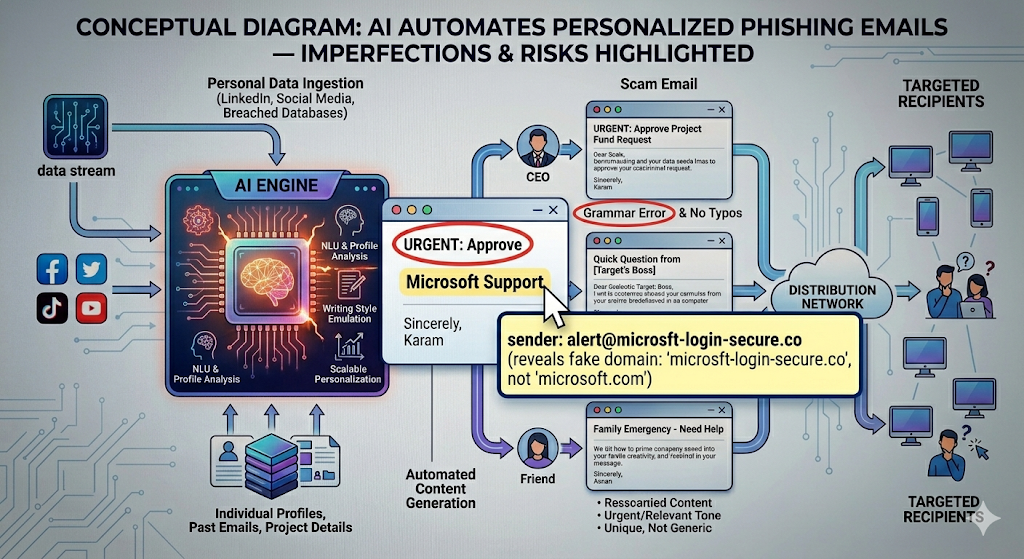
5. Check the Metadata (The “Hidden” Clues)
While the text of an email might be perfect, the “From” address often isn’t. Hover your mouse over the sender’s name. Does it say billing@amazon.com or amazon-support-77@gmail.com? AI writes the message, but it still has to be sent from an account the hacker controls.
How Businesses Can Fight AI with AI
If you’re a business owner, the stakes are even higher. A single “deepfake” video call recently cost a company in Hong Kong $25 million because an employee thought they were talking to their CFO.
Invest in AI-Based Security Filters
Ironically, the best way to catch an AI is with another AI. Modern email security platforms use machine learning to look for patterns that humans can’t see. They check the “DNA” of an email—looking at things like the server it came from and how fast it was generated.
Regular Employee Training
Standard “once-a-year” training is dead. We need to be teaching teams about deepfakes and “spear phishing” (targeted attacks) every month. In my view, the most important thing to teach is skepticism. It’s okay to double-check!
Spotting Deepfakes: The New Frontier of Phishing
We’ve talked about emails, but AI-powered phishing is moving into video and audio. This is called “Synthetically Generated Media.”
Visual Glitches
If you are on a video call and something feels “off,” ask the person to turn their head or wave their hand in front of their face. Deepfakes often struggle with “occlusion”—when something moves in front of the fake face, the image might flicker or blur.
Audio Latency and Tone
AI voices sometimes have a weird, robotic rhythm. They might not breathe in the right places, or their tone might remain perfectly flat even when saying something stressful. Trust your ears. If it sounds “too perfect,” it might be fake.
The Future of Phishing: What’s Next?
As a blogger who has tracked tech for a decade, I see a future where phishing becomes “proactive.” Imagine an AI bot that joins a public Discord or Slack and waits weeks, chatting normally, before finally dropping a malicious link.
Therefore, we must move toward a “Zero Trust” model. This means we don’t trust anyone—inside or outside the network—by default. Everything must be verified.
FAQ: Protecting Yourself from AI Scams
Can AI-powered phishing bypass Two-Factor Authentication (2FA)?
Not directly, but AI can be used to create “session hijacking” attacks where they trick you into entering your 2FA code into a fake site. Always ensure you are on the legitimate website (check the URL!) before entering any codes.
Are Mac users safer from AI phishing than Windows users?
No. Phishing is a “human” attack, not a software exploit. It doesn’t matter what computer you use if you are tricked into giving away your password or sending money.
How can I tell if a voice call is a deepfake?
Ask the caller a personal question that an AI wouldn’t know—something about a shared memory or a specific detail from your last “real” conversation.
Is there software to detect AI-written emails?
There are tools like GPTZero, but they aren’t 100% accurate. Your best bet is to look for the “intent” of the email. If it asks for money, data, or access, treat it as a threat.
What should I do if I’ve already clicked a suspicious link?
Disconnect from the internet immediately, scan your device for malware, and change your passwords from a different device.
Conclusion: Staying One Step Ahead
Learning how to protect against AI-powered phishing attacks isn’t about being paranoid; it’s about being prepared. The technology is getting smarter, but so are we. By slowing down, using MFA, and verifying every “urgent” request, you can keep your data and your money safe.
Don’t let the “high-tech” nature of these attacks overwhelm you. At the end of the day, a scammer is still just a person trying to trick you. Keep your guard up, stay curious, and always double-check.
What’s the weirdest or most convincing phishing attempt you’ve seen lately? Let’s talk about it in the comments below—your story might help someone else stay safe!


