

Table of Contents
Choosing the best AI coding assistant for beginners is the single most important decision you’ll make when starting your programming journey this year. I remember when I first started coding over a decade ago; I spent hours banging my head against the desk because of a missing semicolon.
Today, you don’t have to do that. AI has turned the “learning wall” into a “learning slope.” But with dozens of tools like Cursor, GitHub Copilot, and Claude Code hitting the market, which one actually helps you learn rather than just doing the homework for you?
In my experience writing about developer tools for the last ten years, the “best” tool isn’t always the most powerful one—it’s the one that explains the why behind the code. Therefore, finding the best AI coding assistant for beginners requires looking at how these tools handle errors and logic.
Quick Summary: Key Takeaways
- GitHub Copilot remains the “gold standard” for ease of use and ecosystem integration.
- Cursor is the top choice for beginners who want an all-in-one, AI-native experience without technical setup.
- Claude Code and ChatGPT are unmatched for explaining complex logic and debugging “impossible” errors.
Why You Need an AI Coding Assistant in 2026
If you aren’t using AI to learn to code in 2026, you’re essentially trying to learn math without a calculator. According to recent data, over 84% of developers now use AI tools daily. Moreover, learners using these assistants are nearly 55% faster at completing tasks.
For a beginner, an AI assistant acts as a 24/7 tutor. However, the market is crowded. To find the best AI coding assistant for beginners, you must evaluate if the tool provides context or just code. A good assistant can:
- Explain cryptic error messages in plain English.
- Write “boilerplate” code so you can focus on the logic.
- Suggest “best practices” you wouldn’t know otherwise.
In addition, using the best AI coding assistant for beginners helps bridge the gap between “I have an idea” and “I have a working app.” As a result, your confidence grows much faster than it would with traditional textbooks alone.
1. GitHub Copilot: The Reliable Industry Standard
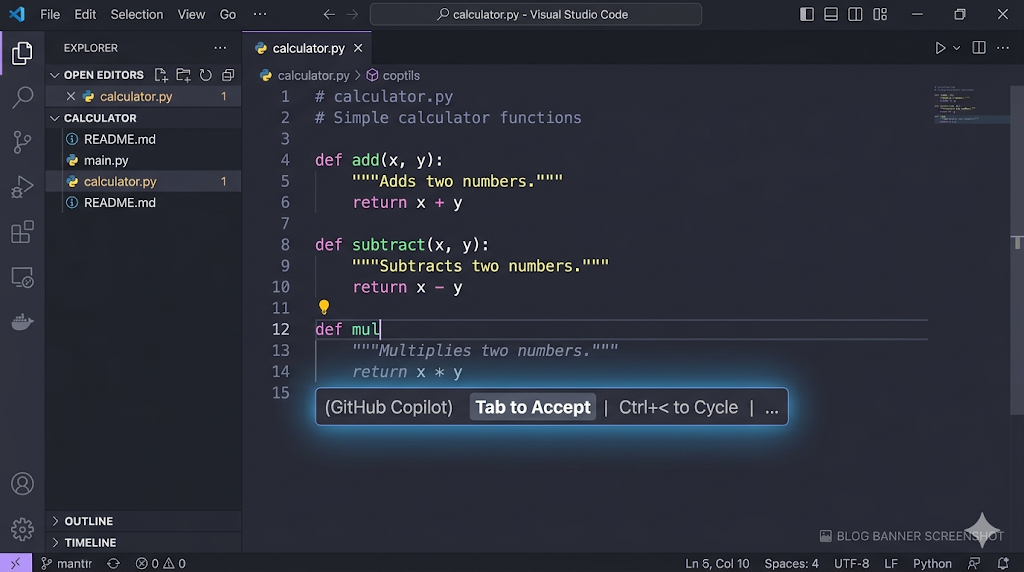
GitHub Copilot is often the first tool people mention when discussing the best AI coding assistant for beginners, and for good reason. It’s owned by Microsoft, which means it works perfectly within VS Code (the most popular code editor in the world).
Why it’s great for beginners:
It feels like “Autocorrect for code.” As you type, it suggests the next line in a light grey “ghost text.” You just hit Tab, and it’s there. This year, GitHub introduced “Agent Mode,” which helps fix bugs across multiple files. For many, this seamlessness makes it the best AI coding assistant for beginners who already use VS Code.
The Downside:
It can sometimes be too fast. If you’re not careful, you’ll find yourself hitting Tab repeatedly without actually reading what the AI wrote. In my view, this is the biggest hurdle when using the best AI coding assistant for beginners.
2. Cursor: The All-in-One AI Editor
Honestly, I think Cursor is currently the best AI coding assistant for beginners who want a seamless experience. Cursor isn’t just a plugin; it’s an entire code editor built from the ground up with AI inside it.
My Experience with Cursor:
I recently used Cursor to build a small React app from scratch. What impressed me most was the “Composer” feature. You can literally tell it, “Make the background blue and add a login button,” and it will show you exactly which lines of code it’s changing in real-time. Because of this visual feedback, many developers consider it the best AI coding assistant for beginners.
Key Features for Learners:
- Chat with your Files: You can ask, “Where is the logic for the user login?” and it will point to the exact file.
- Predictive Edits: It anticipates your next move across different files.
- No Setup Required: It’s a fork of VS Code, so all your favorite themes work immediately.
3. Claude Code: The Logic King for Learners
If GitHub Copilot is the “doer,” Claude (by Anthropic) is the “thinker.” In 2026, Claude 4.6 has become a fan favorite because its explanations feel more human. When you search for the best AI coding assistant for beginners for debugging, Claude’s name always comes up.
Why use it for learning?
Claude excels at reasoning. If you paste a block of code and ask, “Why isn’t this working?”, Claude won’t just give you the fix. It will explain the logic error. Therefore, it might be the best AI coding assistant for beginners who want to actually understand Computer Science fundamentals.
Pro Tip: Use the free version of Claude in your browser alongside your editor to ask high-level architectural questions. This combination often rivals the best AI coding assistant for beginners available in a paid subscription.
4. Replit Agent: Best for Zero-Install Beginners
If you don’t want to deal with installing Python or complex editors, Replit Agent is your best AI coding assistant for beginners. Everything happens in your web browser, which removes the “environment setup” frustration that stops many people from starting.
The “Magic” of Replit:
You can type “Build me a Todo list app,” and the Agent will build the files and give you a live URL. While it is incredibly powerful, is it the best AI coding assistant for beginners? It depends on if you want to learn the setup process. However, for sheer speed, it is unbeatable.
How to Choose the Right Tool for You
Choosing the best AI coding assistant for beginners depends on your specific goals. Here is a quick comparison:
| Feature | GitHub Copilot | Cursor | Replit Agent |
| Best For | Professional standard | Easiest workflow | Quick deployment |
| Ease of Use | High | Very High | Maximum |
| Learning Curve | Low | Low | None |
| Price | $10/mo | Free tier available | Subscription |
In addition to these, always check for student discounts. Often, the best AI coding assistant for beginners is the one you can get for free with a student ID!
Common Pitfalls: How Not to Use AI
As an expert who has seen hundreds of “AI-native” developers enter the workforce, I have to give you a warning. Even the best AI coding assistant for beginners can make you a “lazy” coder if you aren’t careful.
- The Copy-Paste Trap: Never copy code you don’t understand.
- Hallucinations: AI can and will make up functions that don’t exist. Always verify its output.
- Over-reliance: Try coding for 30 minutes a day with the AI turned off.
Using the best AI coding assistant for beginners should feel like having a mentor, not someone doing your work for you. Moreover, if you rely too heavily on the best AI coding assistant for beginners, you might struggle during technical interviews where AI isn’t allowed.
FAQ: Questions Beginners Always Ask
Is GitHub Copilot free for students?
Yes! If you have a valid .edu email address, you can get GitHub Copilot for free. For many students, this makes it the best AI coding assistant for beginners due to the cost savings.
Will AI replace junior developers?
In my view, no. But a junior developer who knows how to use the best AI coding assistant for beginners will absolutely replace one who doesn’t.
Which AI is best for Python?
Python is the most supported language. However, Claude currently holds the highest benchmarks for Python reasoning.
Can I use these tools on a low-end laptop?
Yes! Since the “thinking” happens on the AI’s servers, you don’t need a powerful computer to run the best AI coding assistant for beginners.
Do I still need to learn syntax?
Yes. You need to know enough syntax to tell when the AI is lying to you. Even the best AI coding assistant for beginners makes mistakes occasionally.
Conclusion: Start Your Coding Journey Today
Finding the best AI coding assistant for beginners isn’t about finding the “perfect” tool—it’s about finding the one that makes you excited to build something. Whether you choose Cursor or Copilot, you are already ahead of the curve.
In addition to using these tools, stay curious and keep practicing your manual coding skills. Ultimately, the best AI coding assistant for beginners is a supplement to your hard work, not a replacement for it.
What are you planning to build first with your AI assistant? Drop a comment below and let’s talk! I’d love to help you get started with the best AI coding assistant for beginners for your specific project.


